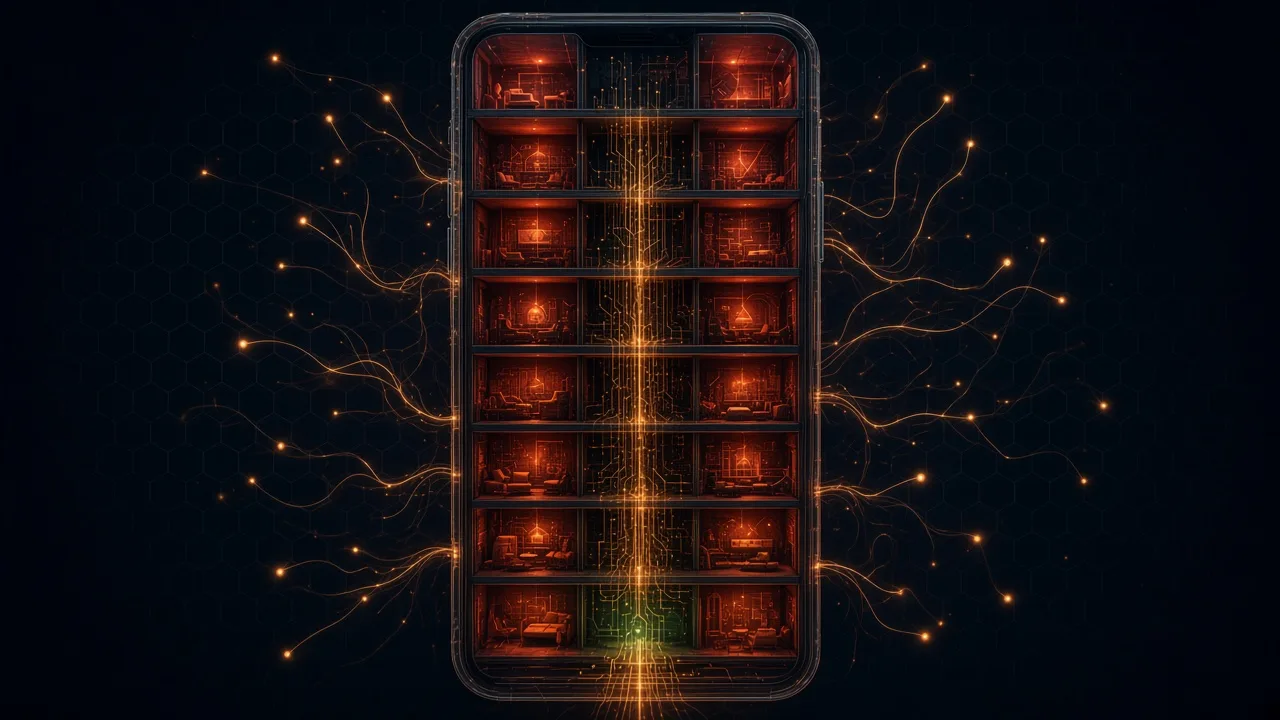
Six months ago I was sure I understood how a phone works. The processor runs the operating system, the OS controls the hardware, airplane mode switches the radio off, a factory reset wipes the data, the Wi‑Fi password protects my traffic, and an error returns an error message. Then we booted our own operating system on a Samsung Galaxy Tab S6 (Snapdragon 855), and I spent half a year bringing up Wi‑Fi on it. By September none of the six beliefs survived: each broke on a specific event, and most of them left a log.
The short version. Code by at least eight authors executes in the device, and yours (the OS and the apps) is the least privileged of them. The fences between the chips' DMA and your memory are held by Samsung's hypervisor and Qualcomm's TrustZone, and for the Wi‑Fi firmware in stock Android those fences are switched off by one line in the device tree. The modem's files live on your disk in partitions a reset does not touch.
And none of this is a property of our OS: we merely got a way to look.
Below, one belief at a time: what I believed, on which event it broke (with logs), what turned out to be true and how to check it on your own device. Contents: who is speaking → six beliefs → who this concerns → how to check yours → not just Snapdragon → what I don't know → a request to commenters.
Who is speaking, and on what
Role, instrument and the main caveat.
I was responsible for Wi‑Fi in a small team writing an operating system in Rust from a blank page: a no_std kernel, scheduler, storage, graphics. The same system runs as a process on macOS and Linux, in QEMU on ARM64, on a Cortex‑M4 with 128 KiB of memory and on this tablet. I am not a security researcher; everything said below about attacks comes from published reports, and I name them.
We never meant to replace Android on the tablet. We needed the tablet as an instrument. There is one way to see what the chips demand of the host and how they react to answers: serve them yourself, without vendor drivers. The language is beside the point: in C or in mainline Linux the logs would show the same.
And the caveat without which the text reads wrong. Who boots the chip, who owns the IOMMU, where the modem's files live, who holds the Wi‑Fi key: all of it is fixed by the bootloader, TrustZone and the hypervisor before any operating system starts. Ours changes nothing here; it gave us a way to look. What follows is a hardware teardown, not a story about our system.
An error returns an error message
About ten reboots of the whole chip without a single line in the log.
On a microcontroller an error looks like a HardFault with an address in a register. I expected the same. The first time, the tablet rebooted about ten seconds after a remoteproc.list command, while idle. No panic, no exception, no interrupt: the USB console went silent, a second later the bootloader logo appeared.
There were about ten such episodes during the bring‑up. I went looking for evidence and found there was nowhere to look. After a warm reset the S‑Boot bootloader hands DRAM back empty; I checked in four places (the image's own NOLOAD page, the last 64 KiB of our RAM, free memory at 2.5 GiB, Samsung's ramoops area), and every boot came up clean. Four empty verdicts cost half a day.
The power‑on reason registers in the PM8150 power chip (PON_REASON1, WARM_RESET_REASON1/2, POFF_REASON1/2) show the same picture after such a reset as after a regular PSCI SYSTEM_RESET: hard reset as the cause, warm reset, an orderly power‑off sequence. The TrustZone log in IMEM is encrypted on Samsung and cleared by the reset. Trying to read it with a debug tool produced the eleventh reset: the tz-log node claims 12 KiB where the parent IMEM has four.
So what survives a reset? The power chip itself; it runs off the battery. In its SDAM block (Android sees it as nvmem) there were 72 free bytes. Before every dangerous step the step's name is written there (pas auth, smem toc, wlfw fw_ready wait); after the step the mark is cleared. The next boot reads what is left. Here is one case (our tool's format, abridged):
sys.boot                          # first command after every reboot
last_reset: reset                 # PM8150 PON: same picture as after PSCI SYSTEM_RESET
previous:
  reason: reset                   # "the last run was up when it ended, and left no words"
  step:   wlfw fw_ready wait      # the mark was set in SDAM and never cleared
The mark does not say who reset us or why. It says where we were. Here: all our requests to the Wi‑Fi firmware had gone out and been accepted, and the reset came while we waited for its reply. That moved the suspicion from “we sent something wrong” to “the firmware touched something at our request”.
First I suspected the MSA region: checked the address live, changed the size from 1.5 to 1 MiB. The reset stayed. The culprits were two clocks left off (rfclka2 and qdss); with them enabled, FW_READY_IND arrived 8 seconds after the modem started.
What is left of the belief. The SoC answers a host error by rebooting the whole chip; there is no error code. Out of ten cases exactly one returned an error: the secure world refused to hand the modem memory at an address that in the live device tree turned out to be hypervisor memory (0x8bc0_0000 from an offline dtsi of another release against the live 0x8c20_0000). Who reboots and why, the host cannot see in any register.
The operating system controls the hardware
Votes instead of commands, a veto instead of a register write.
The third reset came from power. At the handover step we dropped our vote for the cx.lvl rail level to zero, as the reference does. The tablet lived while the modem was busy and died when the modem went idle. The vdd_cx rail powers the digital logic of the whole SoC, and its aggregate was being held up by the modem's vote.
A vote. Power and clocks on Snapdragon are handed out by a separate processor, the AOP (a Cortex‑M inside the SoC), from a command database it also stores; the host is one of the voters, and the bootloader has already left votes on our behalf. The copy of the database in its message RAM is closed: reading it halts the processor. The fix: a floor on levels, cx.lvl never below NOM.
Above the AOP stand two more. Samsung's hypervisor at EL2 owns the SMMU: in the device tree apps_smmu carries qcom,skip-init, “do not touch the global configuration”. When I wrote type bypass into the S2CR register of the Wi‑Fi stream, the register read back as type fault. Not unchanged; rewritten to the opposite. By what mechanism it intercepts this, I cannot see.
Qualcomm's TrustZone at EL3 verifies firmware signatures and launches them (PAS), holds XPU fences over memory regions, owns the modem's registers (QDSP6SS reads as a bus error from the normal world) and decides who owns which piece of RAM (assign_mem). Reading one byte past its fence equals the reset from belief 1.
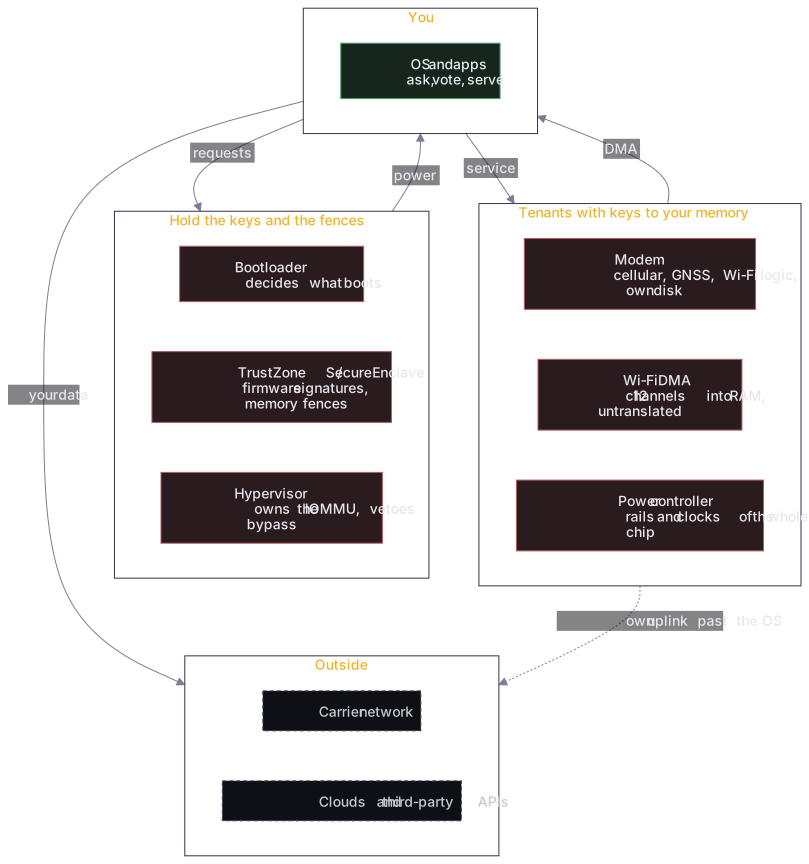
Arrows leaving our box on the diagram: requests (smc), votes (RPMh), service (servers for the modem). Arrows entering it: the right to reboot, the right to read memory, the right not to boot us. I counted five verbs available to the OS: ask, vote, serve, validate, lock what you can reach. “Forbid” and “inspect their code” are missing from that list; that is how a modern SoC is built, and our OS has nothing to do with it.
Stock Android lives under the same conditions: the same line in the tree, the same hypervisor. The difference is that its drivers know this and do not try.
The Wi‑Fi chip is a peripheral
950 lines on a dev board against 32,000 on the tablet, and where the difference went.
On an STM32F407 dev board an ESP32 module hung off a single UART: write AT+CWJAP="ssid","pass", read WIFI GOT IP. A 950‑line Rust driver, a few days. On the tablet “the same thing” took 32,000 lines and those ten resets. The first explanation, “the SoC is more complex”, is wrong; the difference went elsewhere.
On the Snapdragon 855 the WCN3990 chip is a radio front end. All of the 802.11 logic (scan, association, encryption, queues) executes in firmware on the cellular modem's Hexagon DSP: one 80 MB modem.mbn firmware, with WLAN.HL.3.2.0.c3-00910 inside it as a separate protection domain next to LTE and GNSS. There is no separate bus (PCIe) to it; it sits on the system NoC, the same bus as memory.
And this firmware has a list of demands on the host. For Wi‑Fi to come up, the host must run four servers for it: rmtfs (sectors of the modem partitions on disk), tqftp (firmware files; it writes server_check.txt there and will not load without success), pd-mapper (without a reply to kernel/elf_loader WLAN does not start) and memshare (transferring RAM regions into its ownership via the secure world). Plus SMEM, GLINK, QRTR, QMI and seven power rails.
Where does its DMA go? The firmware has 12 copy engines; they write to RAM as stream 0x640 through apps_smmu. In the stock Tab S6 tree the qcom,icnss@18800000 node is marked qcom,smmu-s1-bypass: the address the firmware puts in a descriptor is a physical RAM address. Kernel, heap, network passwords, tokens. The only fences in front of it: the hypervisor's stage‑2 and TrustZone's XPU. Both foreign, and their tables cannot be read from EL1.
Why Wi‑Fi rather than the GPU or the camera? In the same tree the GPU and the camera sit behind an SMMU with translation configured by the kernel; bypass is set only for Wi‑Fi. The reason, as far as I understand, is simplicity: the downstream icnss driver has worked this way for years, and our first bring‑up went the same way because enabling translation along the way broke initialisation with a reset.
Mainline Linux on the HDK SM8150 with the same WLAN.HL.3.2.0 firmware enables translation through dma-iommu; arm-smmu-qcom.c has a list of identity clients, and qcom,wcn3990-wifi is not on it.
Our stage‑1 for stream 0x640 is not enabled yet. It is in the plan and marked “not done”; I will come back to it in the list of what I don't know.
The Wi‑Fi password protects my traffic
The password stays on the host, the traffic key goes to the modem. For everyone.
We wrote 802.11i ourselves: the WPA2 4‑way handshake, the group handshake, SAE for WPA3, a crate with no unsafe. The password lives in the kernel store; from it the host derives the PMK (PBKDF2‑SHA1, 4096 rounds), and from the PMK and the nonces the PTK. The firmware sees the EAPOL frames in the clear (they are in the clear over the air too), but sees neither the password, nor the PMK, nor KCK/KEK.
And then the host does the same thing wpa_supplicant does through nl80211 and ath10k_set_key on Linux: it hands the firmware 16 bytes of TK and the group key with the VDEV_INSTALL_KEY command. From that moment every frame of the session is encrypted and decrypted by the firmware (hwcrypto). Outgoing Ethernet frames the host places in the DMA window in plaintext; incoming ones it receives already decrypted.
What does a supplicant on the host protect? The credentials: a compromised firmware cannot join the network as another device and cannot open other sessions on the same network. What it does not protect: this session's traffic. For the firmware it is plaintext by definition, and no line in the supplicant fixes that. On Linux, Android and ours the “traffic key” column holds the same word: firmware.
The practical conclusion for me turned out not to be about Wi‑Fi. Content is protected by exactly what was encrypted before reaching the modem: TLS with certificate verification and end‑to‑end encryption in the messenger. On three of my own boards I found HTTPS without certificate verification (in ESP‑AT that is the default, CIPSSLCCONF=0). In IoT it is common practice; check your devices.
A VPN belongs in its place here too. It hides traffic from the ISP and from a stranger's Wi‑Fi. Browser fingerprint, timezone, account logins and the modem's own uplink to the carrier network (belief 6) it does not touch. Websites compare the IP with the timezone from Intl.DateTimeFormat, the language and the system clock; a mismatch (address in Amsterdam, clock in Moscow) identifies a person more reliably than the address.
A factory reset wipes everything
Modem partitions on your disk, 23 milliseconds and a shadow instead of a disk.
The fifth reset was of the modem rather than the whole SoC, and it left a clue: time. The rmtfs server keeps a per‑caller log. Here is what was in it (abridged):
rmtfs  OPEN  /boot/modem_fs1   ok   read hdr: 1 sector @512
rmtfs  OPEN  /boot/modem_fs2   ok   read hdr: 1 sector @512
rmtfs  OPEN  /boot/modem_fsg   ERR  no such partition
smp2p  slave-kernel 6 -> 7                      (+23 ms)
rproc  mss: running -> crashed
This tablet's GPT has no fsg partition (the golden copy of EFS) at all. We answered with a refusal, as the qrtr rmtfs for Linux does, and 23 ms later the SMP2P slave-kernel word changed from 6 (“ready”) to 7 (“fatal”). Every time.
Control: if rmtfs is not started at all, the modem lives about 40 seconds and dies with efs sync failed. Why a refusal is instantly fatal while a missing server takes 40 seconds, I don't know: the firmware is closed, and there is no reason in SMEM (SMEM_SSR_REASON_MSS0); the modem dies before its error service starts.
The workaround: fsg is opened blank, a shadow of zeros the size of modemst1. The modem's EFS knows the “erased golden copy” state: it reads the header, picks a working copy, moves on.
This later became the rule for all our servers. On OPEN the partition is read into RAM once, every RW_IOVEC goes to the copy, there is no write path to disk in the code. The modem sees its writes “land”; the disk never changes. The price: some cellular functions will not work without persistent EFS.
Now to the belief. modemst1, modemst2, fsg, fsc are partitions on your UFS. Neither a factory reset nor an OS reinstall touches them: EFS is meant to survive a reboot by design. On Linux and Android the rmtfs and rmt_storage servers do exactly what the modem asks: read and write the real partitions. What is inside I did not analyse and do not claim; I only saw the access pattern.
What does this mean for “reset before selling”? The reset does wipe userdata (the encryption key is destroyed). The modem partitions stay as they were. The data there is the modem's, but whoever once wrote there (with physical access through EDL mode, say) survives any reset. The reset itself has a history too: in 2015 Cambridge showed that a factory reset on the Android of the time did not fully erase user data.
Since we are on storage the host cannot reach: the tablet has two more of those. The SIM card with its own OS and applets (Simjacker in 2019 sent commands through the S@T Browser applet, and the card, using the modem, reported location over SMS at carriers in roughly 30 countries). And the storage controller with its own firmware (a Samsung eMMC bug in 2012, MAG4FA/VYL00M chips, turned an ordinary wipe in recovery into a brick).
Airplane mode switches the radio off
A request to the modem, and the modem has its own uplink and its own GNSS.
This belief I lost without a reset, just by reading the firmware's list of demands to the end. The modem has its own radio and its own uplink to the carrier network. Airplane mode on Android is a request from the OS to the modem; the modem enters low‑power mode under its own firmware and decides for itself what to do with the request.
Since 2019 iOS deliberately keeps Bluetooth and Wi‑Fi on in airplane mode. How do you make sure the radio is silent? Only by measuring from outside, with an instrument rather than the status‑bar icon.
Qualcomm's GNSS is in the modem as well, a separate protection domain on the same Hexagon. The firmware knows the device's coordinates without asking the OS. In 2023 Nitrokey recorded that Qualcomm phones without Google services talk to izatcloud.net; Qualcomm replied that this is the XTRA service (assisted GPS), described in its privacy policy. Not a compromise. An illustration that the subsystem has relations with the outside world of its own.
There are devices where airplane mode is a real switch. The Librem 5 (around $1,000) and the PinePhone (from $150, 2016‑class silicon) move the modem onto USB, where it has no DMA into host memory, and hardware switches cut power to the radios.
Can a phone be built with no foreign code at all? The PinePhone's modem is a Quectel EG25‑G with a closed baseband and its Wi‑Fi is Realtek with closed firmware; the Librem 5's modem on M.2 is closed too. The only device I know of where all the code is yours is the Precursor (an FPGA SoC), and for exactly that reason it has no cellular modem. An open baseband with carrier certification does not exist.
Who this concerns
Proportions, five classes of attackers with documented cases, risk groups.
Proportions first, so that this does not become a gun on the wall. The overwhelming majority of documented targeted attacks on phones go through the OS and messengers (Pegasus via iMessage, Predator via links), not through the baseband. Modem and Wi‑Fi firmware is the layer patches reach last (for non‑Pixel devices the lag is measured in months) and that neither MDM, nor antivirus, nor the owner can see.
| Attacker | What they need | What they get | Documented case |
|---|---|---|---|
| Access to the carrier network | Nothing: the modem does what it was made for | Location, SMS, call metadata | Banking mTAN intercepted via SS7 (O2 Germany, 2017) |
| Physical access | An hour with the phone and a forensics kit | All contents plus a persistent implant | Serbian police and Cellebrite against a journalist, CVE‑2024‑43047 in the Hexagon DSP (Amnesty, 2024) |
| Remote baseband RCE | The phone number and a vendor‑grade exploit | Voice, SMS, traffic, a path into the main OS | 18 zero‑days in Exynos, four RCE by number (Project Zero, 2023) |
| Wi‑Fi over the air | Be within range of your network | The Wi‑Fi firmware, then the kernel via DMA where there is no translation | Broadpwn (2017), QualPwn (2019) |
| Persistence | Write to the modem partitions once | Survive a factory reset | Structurally possible; incomplete reset shown (Cambridge, 2015) |
Does this mean you will be hacked through the modem? Most likely not. What follows is this. The model “installed a VPN, turned on airplane mode, did a reset” rests on the assumption that these actions control the hardware. They control requests to the hardware, and the difference shows exactly when something depends on it. By group:
- An ordinary person. The only real threat is the first row, the carrier network. Measures: a second factor not over SMS, a messenger with end‑to‑end encryption, TLS everywhere. Cost: an hour. The other four rows are theory for them.
- A journalist, a lawyer, an admin with production keys, anyone whose phone may be seized. Rows two to four were used against exactly these groups; reports with names exist. Checking your device (next section) costs ten minutes; a phone with the modem behind a fence costs money.
- A company with a fleet of devices. The practical risk is the baseband patch lag and the fact that an inventory of “which modem, is DMA translated” is usually not kept at all. Do it once with the commands below.
Not on the list: your neighbour hacking your modem; a mass baseband worm; spying through the camera by the Wi‑Fi firmware (it has neither microphone nor camera; the only path is through the host). None of that is documented, and I do not claim it. There is also a demand on vendors that costs nothing: enable stage‑1 SMMU translation for Wi‑Fi in the stock firmware. That is one default in a device tree, not a law on open modem code.
How to check your own device
Ten minutes, no disassembly. Linux, Android, Windows, iPhone.
Linux (a laptop or a phone with mainline). Whether the Wi‑Fi card's DMA is translated shows in the type of its IOMMU group; who serves the modem shows in the processes:
for d in /sys/class/net/*/device; do
  echo "$(basename $(dirname $d)): $(cat $d/iommu_group/type 2>/dev/null || echo 'no IOMMU')"
done
pgrep -a 'rmtfs|tqftpserv|pd-mapper'      # who serves the modem and what it writes to
Android (needs adb shell; root is not required for the first two commands on most devices, though on some by-name is closed):
adb shell ls -l /dev/block/by-name/ | grep -E 'modemst|fsg|fsc'
adb shell find /proc/device-tree -name 'qcom,smmu-s1-bypass' | grep -iE 'icnss|wifi|wlan'
adb shell ls /proc/device-tree/soc | grep -iE 'icnss|cnss|wifi' # icnss: on the modem; cnss/PCIe: separate chip| What to look at | Where | What it means |
|---|---|---|
iommu_group/type | Linux | DMA, DMA-FQ: translated. identity: physical addresses. No file: no IOMMU in front of the device. |
modemst1/2, fsg, fsc | Android | Found: that is the modem's EFS on your disk; a factory reset does not touch it. |
qcom,smmu-s1-bypass on icnss/wlan | Android | Found: the Wi‑Fi firmware writes to RAM by physical address. |
icnss or cnss | Android | icnss: Wi‑Fi executes on the modem (845/855 and some 6xx/7xx). cnss: a separate chip over PCIe (865 and newer). |
| “DMA Remapping Policy” | Windows, Device Manager → adapter → Details | 2: DMA is translated. 0, 1 or no property: physical addresses. msinfo32 → Kernel DMA Protection covers only external ports. |
| Model number | iPhone | Nothing to check: a DART always sits in front of the modem. Which modem is inside, from iFixit teardowns: the 17 line on Qualcomm X80, Air/16e on Apple C1. |
What any phone will show you: nothing about the radio. Airplane mode is a request, and the only way to check that the modem is silent is an instrument outside.
Not just Snapdragon, and not just a phone
The same protocol in laptops and iPhones; the same architecture at other vendors.
The protocol I served is Qualcomm's for any host. The same QMI WLFW and the same demand for memory on FastConnect in Snapdragon 865 and newer (there the firmware runs on its own core, but REQUEST_MEM_IND asks for tens of megabytes for DMA). The same servers on Snapdragon X Elite laptops.
The same modem in iPhones (the whole 17 line on the X80), with a DART always in front of it. On x86 laptops with QCA cards (Lenovo, HP and Dell ship them in volume) DMA translation under Windows is enabled only if the driver declared DmaRemappingCompatible.
Broadcom, MediaTek, Exynos use other names and the same architecture: a separate processor, signed firmware, DMA, demands on the host. Nobody builds Wi‑Fi without firmware on a separate processor: 802.11 timings in microseconds do not live under a general‑purpose OS.
Thunderclap showed in 2019 that a device in a Thunderbolt socket reads host memory on macOS, Linux and Windows even with the IOMMU enabled, because the OS drew the fence too wide. On a Raspberry Pi the first thing to start is the VideoCore with closed firmware; it initialises memory and starts the ARM cores, and Linux talks to it through a mailbox.
The ESP32 in a light bulb is a different case. The Wi‑Fi stack blob (libnet80211, libpp, libphy) is linked into your image and runs on your processor, with your keys in eFuse. Foreign code, your perimeter: it has nowhere to hide and nothing to demand. Vulnerabilities are found in it too (CVE‑2019‑12586, BrakTooth); the consequence is RCE in your process, where all your code already is, rather than in a subsystem with its own way out into the world.
What I don't know and haven't done
A list I consider part of the result.
- Stage‑1 translation for stream
0x640is not enabled on our side. The plan: the same SMMU bank,SCTLR.M = 1, page tables covering only the 4 MiB window. The hypervisor may veto this too; the only way to find out is one run with a reset risk. - Why a refusal on
fsgis fatal in 23 ms while a missing server takes 40 seconds. The firmware is closed; I claim only the timing and the reproducibility. - What is in the hypervisor's stage‑2 tables and why bypass is forbidden. EL2 cannot be read from EL1.
- Regions handed to the modem through
memshare(MSA, thermtfsbuffer) it writes by its own path, pastapps_smmu. Stage‑1 does not lock them; there are only minimal grants and TrustZone's XPU. - There is no entropy device on this board yet: handshake nonces come from a predictable source. This is recorded as not cryptographically sound and must be fixed before the network becomes more than a test.
- The code of TrustZone, the hypervisor and the modem I have not read and cannot: it is signed and closed. The boundary is drawn around it, at the four servers and the SMMU bank, not inside.
A request to commenters
What I am missing to make the table above wider than one tablet.
Everything above was checked on one device. What I lack is the output of the commands from “How to check” on others. Of particular interest: iommu_group/type for Wi‑Fi on laptops with Qualcomm and MediaTek cards under Linux;
Also whether your Snapdragon devices have an fsg partition (the Tab S6 has none, and I don't know whether that is the exception or the rule); whether qcom,smmu-s1-bypass is set on icnss on other 845/855 devices; and what the equivalent looks like on Exynos (Shannon) in the device tree.
If anyone has measured the radio in airplane mode with an instrument rather than by the status‑bar icon, that would close the one belief out of six that I lost on other people's data rather than my own. If you find a factual error, say so; I will fix it.
The engineering detail is in the eight articles of the series “Whose computer is this?”: addresses, registers, source code. Silent resets separately here, the hypervisor and the SMMU here, the WPA boundary here. If you have a device, an agent or an infrastructure you want to know the owner of, write to [email protected].
Products in this article
Find out who owns your device
Audits of devices, firmware, agents and infrastructure with a written scope and a “cannot” list. Or a home and an AI on a platform where you are the owner.
 Whose Computer Is This? Yours, or…
We wrote an OS from scratch in Rust and booted it on a Samsung Galaxy Tab S6. Inside the device live at least eight executing entities — seven of them not ours, and almost every one can kill us. The opening map of a series on who really owns a modern SoC.
 The Parasite in the Tablet
On the F4VE breadboard Wi‑Fi was 950 lines behind a UART. On a Snapdragon 855 tablet it became 32,000: nine stages, a dozen silent SoC resets, four servers we run for the chip. The 'Wi‑Fi chip' is half a modem with DMA, a file system and its own radio — a tenant with the landlord's keys. What it can do, whom it concerns (every Snapdragon Android, Windows laptops, iPhones with a Qualcomm modem), and how to isolate it transparently.
 A Reset Without Witnesses
The SoC answers a host error not with an error but with a reboot — and leaves no evidence: DRAM is wiped, the PMIC looks routine, the TrustZone log is encrypted. How we built a witness in 72 bytes of PMIC memory and turned ten silent resets into a table of causes.