
You open a staging build as a "DE" test user. The API returns prices in euros. The page still says good evening in your real timezone and formats dates like home. The scenario is already dirty — before anyone looks at headers.
The problem
The staging site is opened as test user “DE”, the API returns prices in euros — and the page greets you in your real timezone. The scenario is dirty before anyone looks at the headers.
What we did
Showed where the leak is (Intl.DateTimeFormat gives the system zone to any origin), why “change the OS clock” is a bad fixture, and assembled an honest cycle: scope → VPN exit from the ticket → Timezone Spoofer with auto-detect → the app.
What came out
A fixture where IP and clock tell one story, and the test checks the system rather than the anti-fraud reaction to a mismatch. And the tool's boundary: canvas, fonts and the logged-in account are not its job.
This is not an attack guide. It is the opposite: authorized testers keep the fixture honest, so locale, geo-offer and anti-fraud checks are actually the thing under test.
What the page can read without asking
Any origin can call Intl.DateTimeFormat().resolvedOptions().timeZone. No permission prompt, no GPS. The engine answers with the system zone, not the zone of the VPN exit and not the Accept-Language you set in DevTools.
The same family of APIs leaks offset, locale, and how Date prints. Anti-fraud and fingerprint scripts look for exactly that mismatch: IP says Amsterdam, clock says Asia/Dubai. In a test, the same mismatch means you are not exercising the Frankfurt path you wrote in the ticket.
Why "just change the OS clock" is a bad fixture
OS-level clock tricks break your calendar, CI timestamps, and every other app on the laptop. A VM per locale is honest and slow. We built a smaller tool because we hit this on our own web work.
Timezone Spoofer is a Manifest V3 extension (Safari companion on the App Store) that patches Date and Intl in the page context, iframes included, at document_start. You pick from 400+ IANA zones — search by city, region, or UTC offset — apply, the tab reloads already living there.
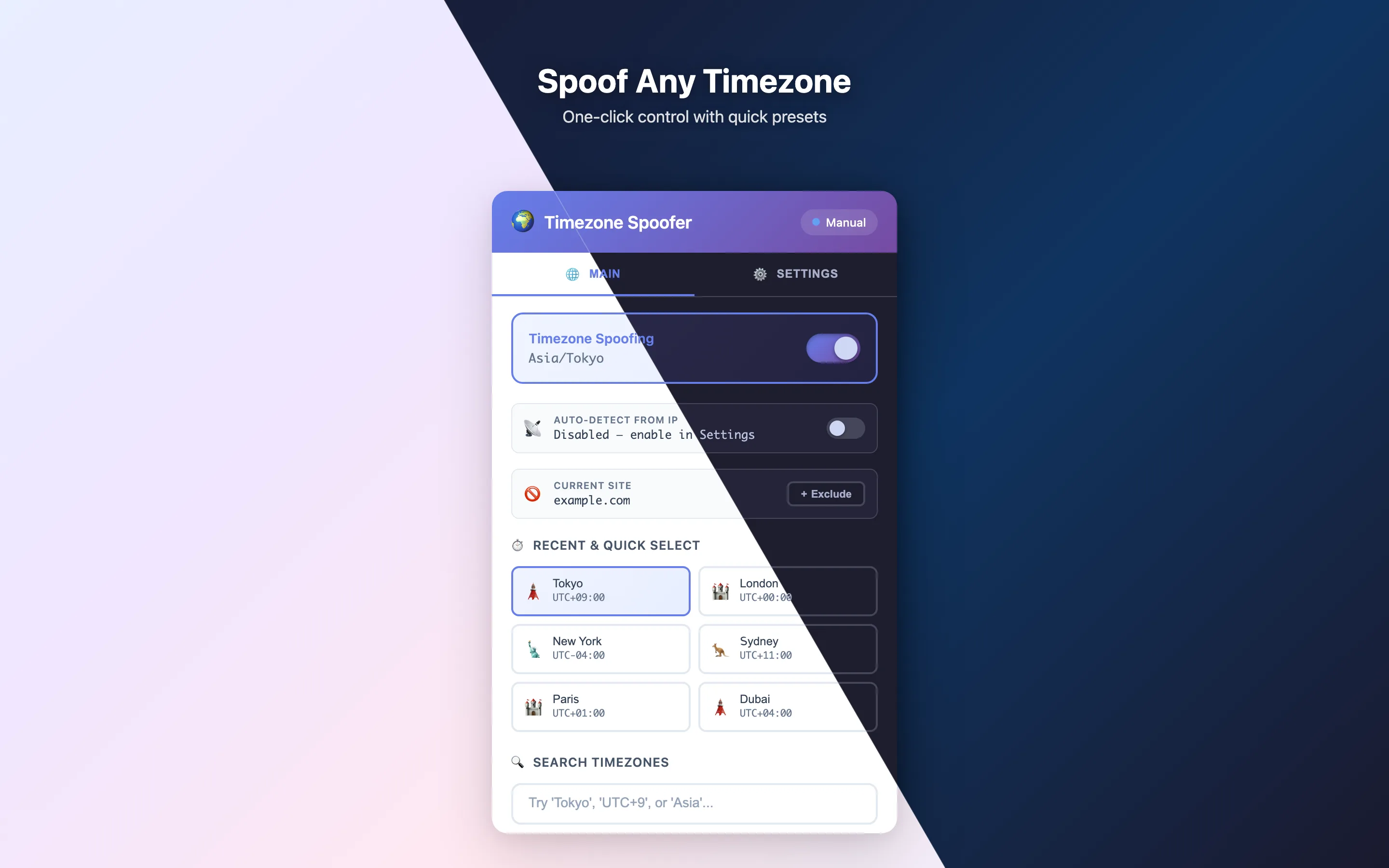
For a test account that must follow a VPN exit, auto-detect from IP is the useful switch: the clock tracks the new address. Per-site exclusions keep the bank and the calendar on real time. Storage is local. No account.
IP and clock are one story
A timezone patch without a matching exit is still a half-fixture. For authorized work that needs a different address — not a lecture on "hiding" — we use Noname VPN: a key from @unlocknoname_bot in about a minute, a free day to check the route, no email. The same key lands in the iOS and Android apps.
The short loop we actually run:
- Scope is written. Staging or an asset you are allowed to touch.
- Connect the VPN exit that matches the ticket.
- Enable Timezone Spoofer auto-detect (or pin the IANA zone by hand).
- Only then open the app under test.
The longer argument — why the tester's home laptop shows up in screenshots and logs — is pentest OPSEC. The difference between a scan, an assessment and a pentest is the first piece.
Half of the “findings” in anti-fraud tests are artefacts of the tester's dirty fixture. We keep Timezone Spoofer free and open precisely as an honest-test tool, and in our own engagements it sits in every checklist before the first request.What you can order from us
Zero Day Labs takes authorized security work — we use the same products described in this series, not a rented scanner PDF.
You can write to [email protected] or the contact form and ask for:
- a security assessment (map of assets, controls, residual risk);
- an authorized pentest on a written scope;
- a web application review (from the editor: DOM, network, evidence);
- a review of agent and tool isolation (what the agent is allowed to call);
- help making test fixtures honest (locale, timezone, exit address) so the report describes your system, not the tester's laptop.
Say which job you want, the scope, and what "done" looks like. We reply with a concrete proposal — same rule as the rest of the site.
Products in this article
A test with an honest fixture
A web-app review or black-box anti-fraud testing — two different scopes. Tell us which you need.
 Timezone Spoofer: fix the clock that betrays your VPN
A VPN changes your IP but not your browser clock. Timezone Spoofer — our free extension for Chrome and Safari — fixes the mismatch in one click.
 Pentest OPSEC: your laptop is in the evidence
Screenshots, HAR files and support tickets from a test keep your home IP and clock. Authorized testers treat the laptop as part of the fixture — not as 'just my machine'.
 VPN Chrome extension: what it protects and what it doesn't
A Chrome VPN extension is a proxy for browser traffic only. What it really protects, where it leaks, and when you need a full VPN app instead.